Michael Kato

Blog

Blog Feed

Unity VFX Shaders February 11, 2026

Match 2 Game - Unity 2D

A demonstration of 2D VFX, shaders, animation, and procedural systems built in Unity.

This project started to refresh my knowledge of Unity especially in the realm of 2D which I’ve never really touched. I tried to make as much as possible dynamic and interactive. The main focus was adding visual flair and polish to the interactions.

Highlights

  • Dynamic tentacles that seek out and eat loot drops using inverse kinematics
  • Custom shaders including dissolve, fog swirl, and god rays. All node based, built in Shader Graph
  • Custom particle systems using Shuriken for impact, pickup, and ambient FX.
  • Sprite-based card flip sequences with state machine control for clean transitions
  • Event-driven animation triggers for gameplay feedback (idle, click, flip, reset)

Technical Approach

The tentacle system uses a chain of IK targets that (relatively) smoothly interpolate toward loot drop positions. Once a drop is within reach, the tentacle “grabs” it and plays an eating animation accompanied by screen shake (Cthulhu’s stomach rumbling presumably)

The fog swirl shader combines scrolling noise textures with a radial distortion pass. God rays are screen-space, sampling a bright-pass buffer and blurring along a direction vector pointed at the light source. Both are lightweight enough to run without issue on mobile hardware.

Tools

Unity 2D, C#, Shader Graph, Shuriken for VFX, Inverse Kinematics


Blender Geometry Nodes VFX June 10, 2025

Electric Outline Effect in Blender

Transforming any 3D model into colorful dots connected by lightning, in Blender with Geometry Nodes.

I wanted to create an effect that could take any arbitrary mesh and convert it into something that looked like an electrical schematic come to life: points of light connected by arcing, noisy lightning bolts, all wrapped in a color gradient.

The entire effect is non-destructive and works on any mesh.

How It Works

The pipeline is built with Blender’s Geometry Nodes and a little shader magic. It works like so:

  1. Mesh to Point Cloud - The input mesh is converted to a point cloud, distributing points across the surface.
  2. Nearest-Neighbor Connections - Each point connects to its closest neighbors via splines, forming the initial connection.
  3. Subdivide + Noise - The splines are subdivided and random noise is applied to each control point, creating an electric feel.
  4. Cylinder Extrusion - A cylinder is extruded along each spline path.
  5. Color Ramp - A color gradient is applied along the Z axis. Each point samples its position and stores the color as an attribute. We could change this to be anything, like for example sampling the surface color nearest the dot… TODO?
  6. Shader Hookup - In the material, the stored color attribute is extracted and piped into the emissive channel to give the electical arc a color.

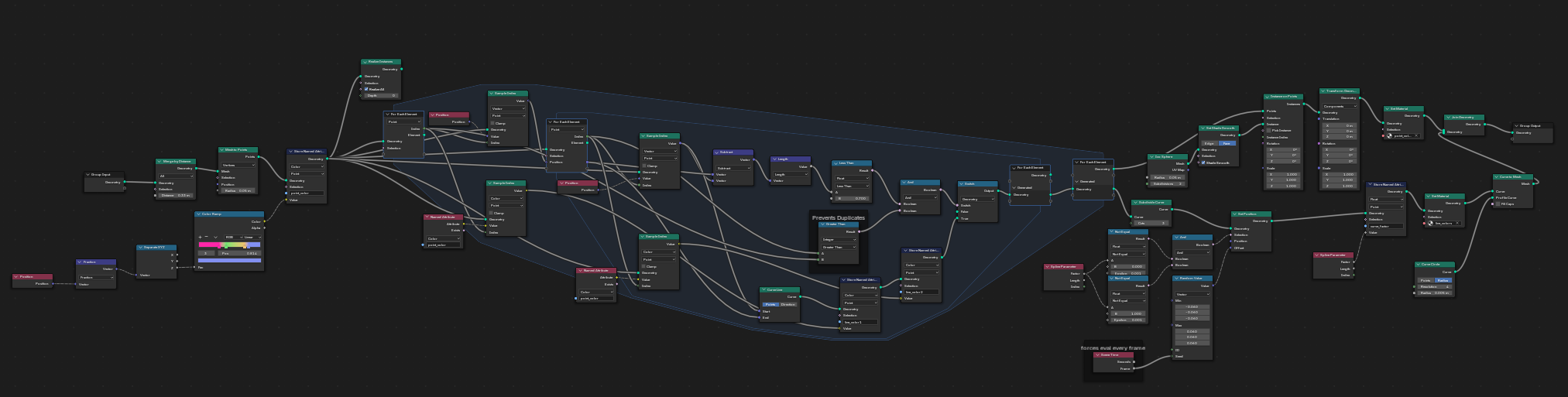
The Node Graph

The geometry node setup above shows the full pipeline.

Geometry Nodes setup in Blender

The slowest part is the inner loop where each point finds it’s nearest neighbors to connect an electric arc. The time complexity is O(n²) which is the absolute worst case possible. I’d like to optimize it one day perhaps by using the new raycast node the recent Blender version, which wasn’t available at the time. There are probably other ways to optimize this too.

What I Learned

Geometry Nodes reward thinking in terms of data flow rather than traditional modeling operations. The “subdivide then displace” pattern for creating organic-looking connections between points is surprisingly versatile. The same approach could generate coral, root systems, or circuit board traces with different noise parameters.

Tools

Blender 4.5, Geometry Nodes, Shader Editor